About this course
A semester in the workflow that professional engineers actually use in 2026. Students learn to work with Claude Code (an agentic tool that reads a whole project, plans a multi-step change, edits files across the codebase, runs commands and tests, and works with git), and they learn enough real coding fundamentals to read, judge, and debug what it produces rather than rubber-stamping it. The project is a genuine multi-feature app: a simple learning-management system with courses and lessons, a database, student and instructor accounts, and progress tracking. Students finish able to demo a deployed app and explain the actual code behind at least part of it.
Is this the right fit?
- Who it’s for
- Students aged 14–18 who want the workflow professionals use: agentic coding, the terminal, git, and enough fundamentals to read and judge the code.
- Prerequisites
- Comfort using a computer and a genuine willingness to read code, not just generate it. Prior building experience helps but is not required.
- Tools students use
- Claude Code, VS Code, git, and a Supabase backend, on school-operated accounts
- Where it leads
- Most students go on to Claude Code Bootcamp II.
Class schedule
Four weekly time slots: three for families in the Gulf and Asia (Friday, Saturday or Sunday afternoon in Dubai) and one for the Americas. Pick the one that fits; a coach confirms it when you enroll.
Times below are for the Fall term 2026 (2-hour classes). The Spring term 2027 starts at the same times with 90-minute classes.
Times convert to your zone automatically and account for daylight saving. A coach confirms your slot when you enroll.
What students walk away with
- The agentic loop: describe the goal, review the plan, let it run, read the diff, test, commit
- Enough real fundamentals (variables, functions, data, HTML/CSS/JS) to read and judge generated code
- The terminal and git in practice: navigating a project, running a dev server, commits and diffs
- A deployed, database-backed LMS with accounts, roles, and progress tracking
- A git repository the student can keep building, and the ability to explain their own code
What students build
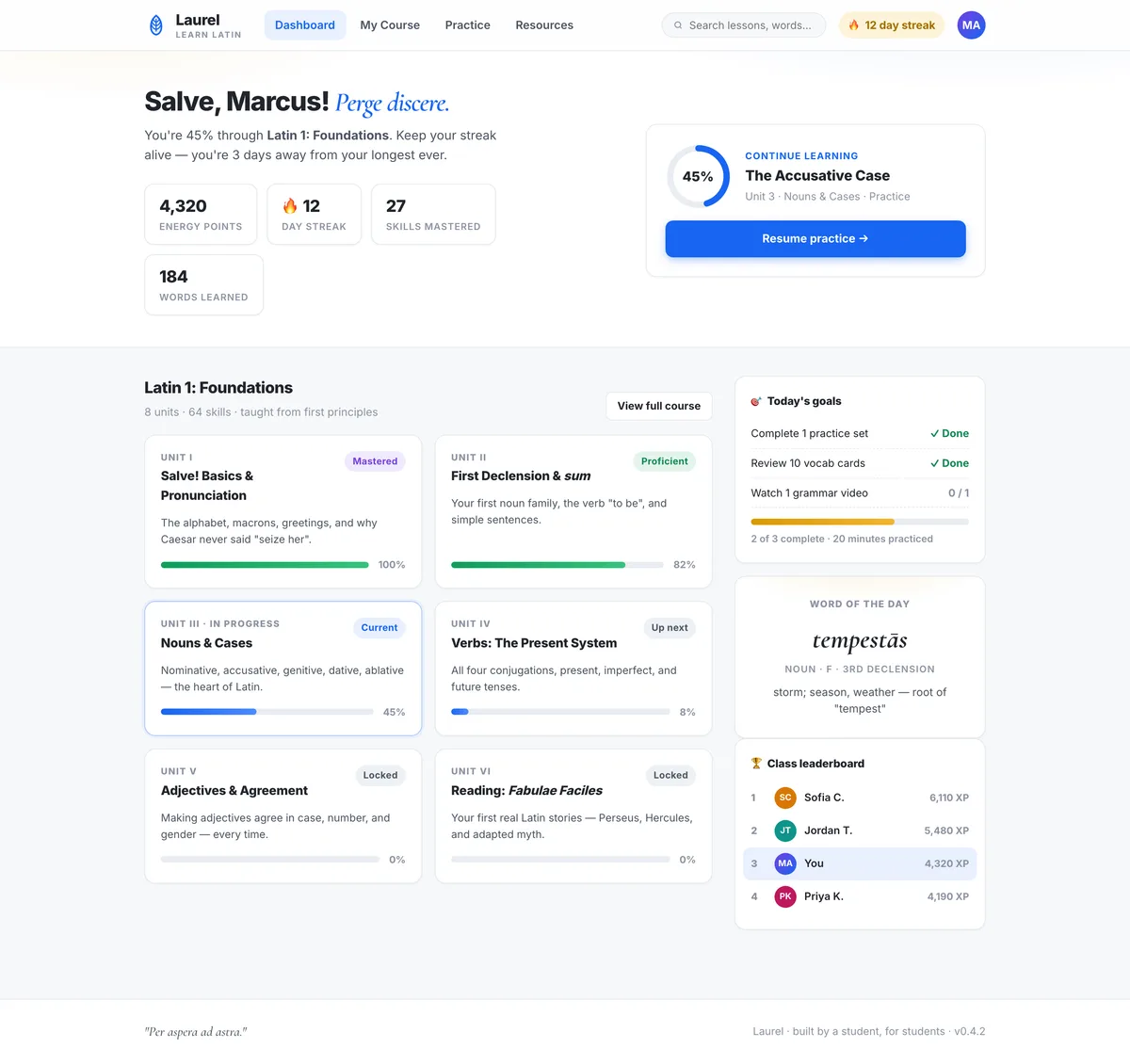
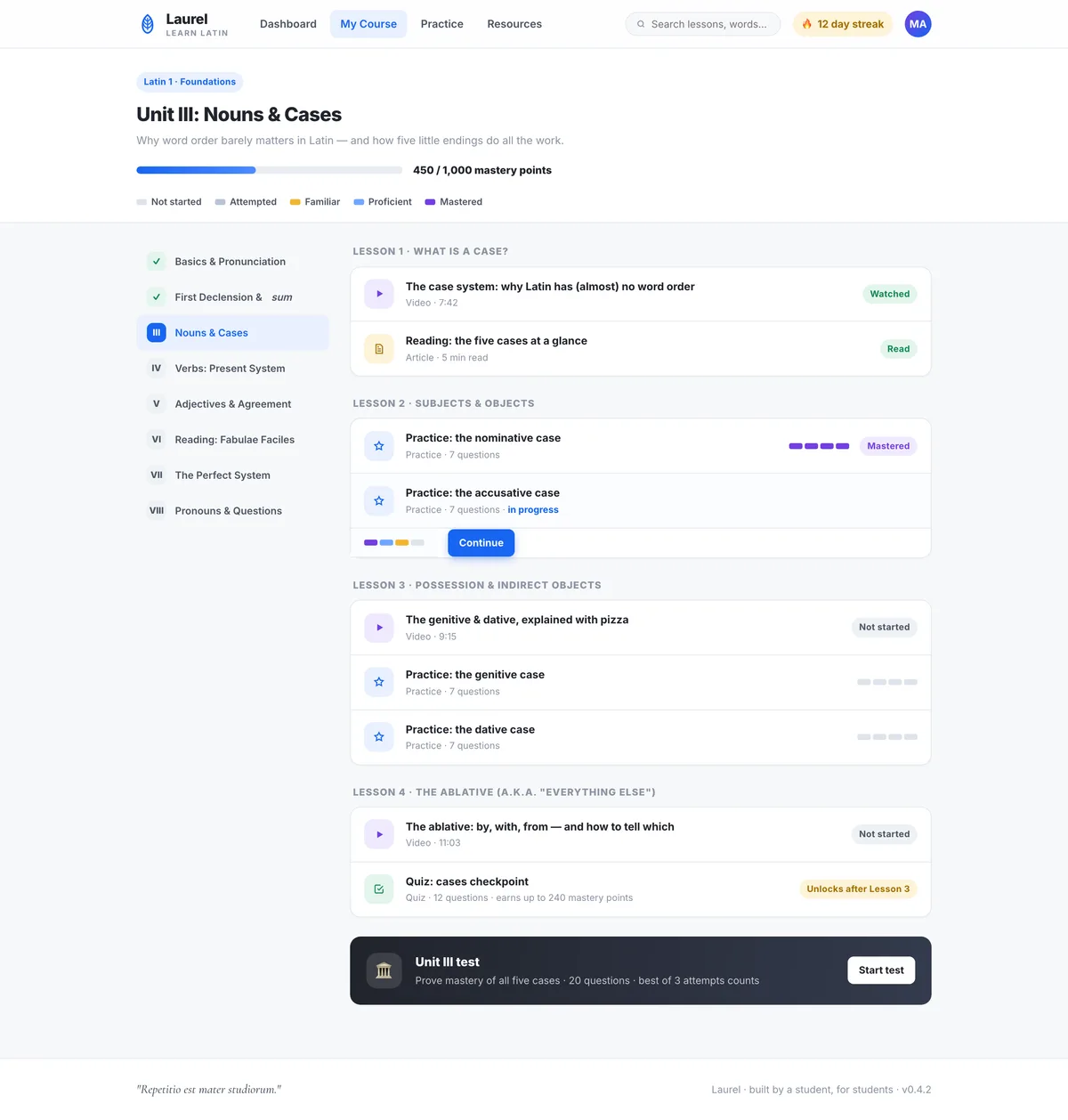
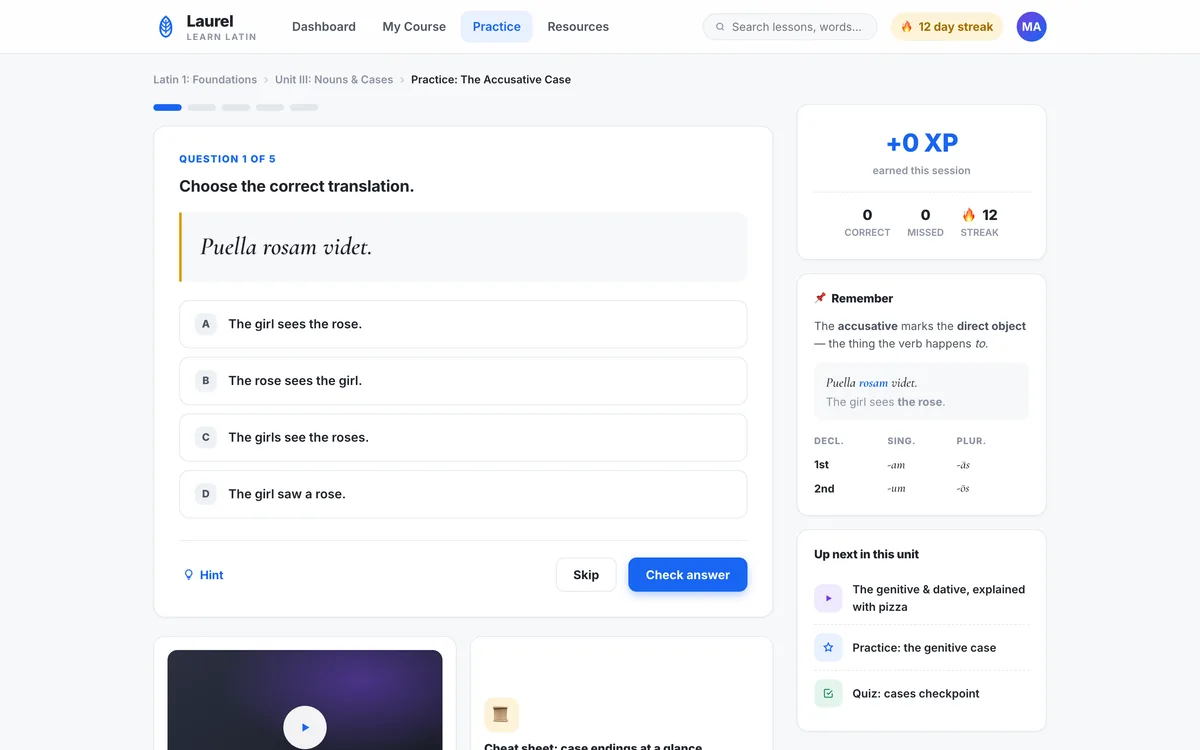
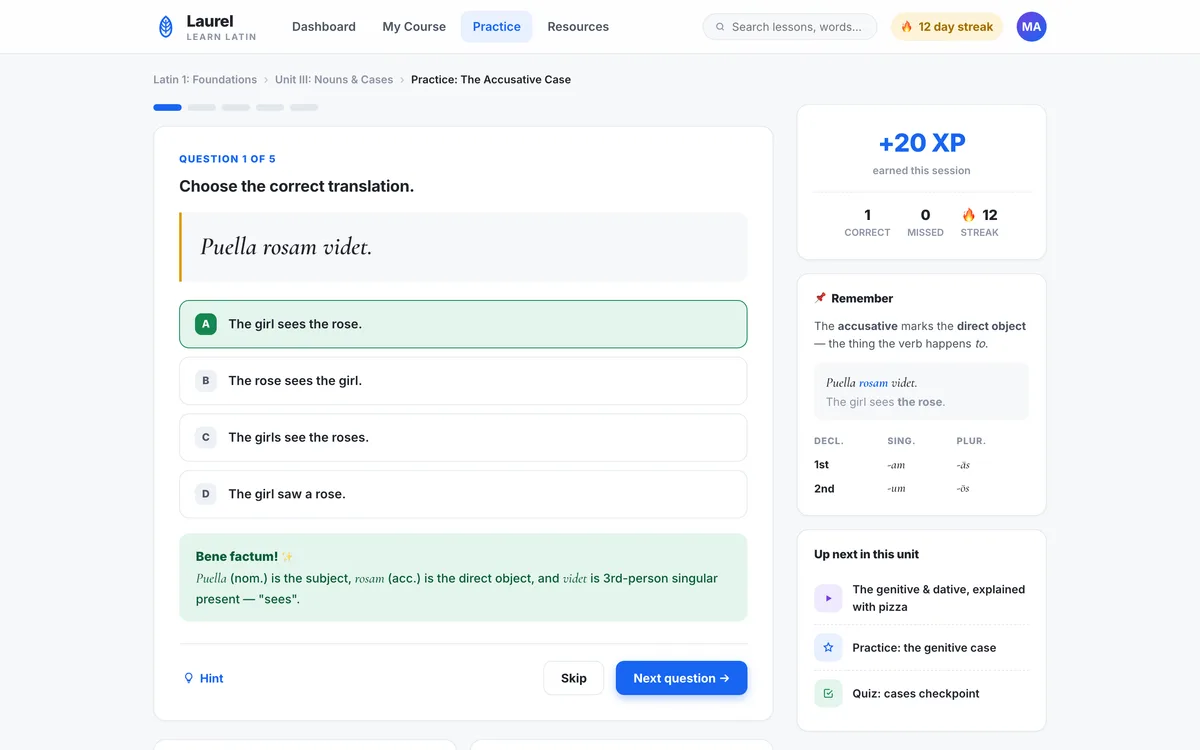
A full learning-management system: the exact kind of app this bootcamp builds
This is the project you ship in the bootcamp: a genuine learning-management system with courses, lessons, a database, student accounts, and progress tracking, built by one of our students (a high schooler in Dubai who loves Latin) in code you can read, judge, and explain.
What a session looks like
- 0:00
Standup
Each student states what shipped, what is blocked, and what is next.
- 0:10
New technique
The week's skill, taught live against the real project, not a toy example.
- 0:30
Guided build
Students drive Claude Code on their own copy of the app while the coach moves between them.
- 1:15
Read the diff
Each student walks the coach through a change they accepted this week and why. This is the assessment.
Curriculum
The Fall term 2026 (Oct 23 – Dec 20) teaches this course in 9 2-hour sessions. The full 12-week Spring term 2027 plan follows.
Fall term 2026: the 9-session plan
Session 1: Agentic coding, the terminal & git
Install Claude Code, VS Code and git, run a first task and watch the agent plan, edit and run. Then navigate folders, run a dev server, and make the first commits.
Session 2: Web app anatomy & code you can read
Front-end vs. back-end. Scaffold the LMS by describing it, review the plan before accepting it, and hand-edit the generated code. The rule: read the diff.
Session 3: Courses, lessons & a database
Build the list and detail pages and wire navigation, then add a backend with courses and lessons tables and seed data.
Session 4: Reading & writing data
Load lessons from the database; add create and edit. The front-end talking to the back-end via an API.
Session 5: Accounts & roles
Add authentication and a student-vs-instructor view. Auth and access control, kept simple.
Session 6: Progress tracking
The signature feature: mark-complete plus a per-student progress view. Conditionals, arrays, and state.
Session 7: Debugging like a pro
Deliberately break things; feed errors back to Claude Code precisely, isolate causes, and use git to revert. Add a CLAUDE.md of project rules.
Session 8: Polish & deploy
A styling pass, run the tests, and deploy to a live URL.
Session 9: Demo & walkthrough
Present the live LMS and explain one part of the real code. That proves literacy, not just output.
Spring term 2027
Week 1: What agentic coding is
Install Claude Code, VS Code, and git. Run a first task and watch it plan, edit, and run. The agent reads your whole project.
Week 2: Terminal & git
Navigate folders, run a dev server, make the first commits. Save points and diffs.
Week 3: Web app anatomy
Front-end vs. back-end, files and folders. Scaffold the LMS by describing it, and review the plan before accepting it.
Week 4: Code you can read
Hand-edit the generated HTML, CSS, and JavaScript. The rule: read the diff, do not rubber-stamp.
Week 5: Courses & lessons
Build the list and detail pages; wire navigation. Spot components, variables, and functions in the real code.
Week 6: Add a database
Introduce a backend, create the courses and lessons tables, and seed data. Tables, rows, and CRUD.
Week 7: Reading & writing data
Load lessons from the database; add create and edit. The front-end talking to the back-end via an API.
Week 8: Accounts & roles
Add authentication and a student-vs-instructor view. Auth and access control, kept simple.
Week 9: Progress tracking
The signature feature: mark-complete plus a per-student progress view. Conditionals, arrays, and state.
Week 10: Debugging like a pro
Deliberately break things; feed errors back to Claude Code precisely, isolate causes, and use git to revert. Add a CLAUDE.md of project rules.
Week 11: Polish & deploy
A styling pass, run the tests, and deploy to a live URL.
Week 12: Demo & walkthrough
Present the live LMS and explain one part of the real code. That proves literacy, not just output.
What’s included
- Live small-group classes, capped at 6 students: 9 two-hour classes in Fall or 12 of 90 minutes in Spring
- School-operated tooling with per-student usage caps: no raw API keys
- A git repository the student keeps
- Written feedback on the code students accept each week
- Deployment and hosting for the finished LMS
How to join
- Purchase your seat. Choose your time-zone slot at checkout and pay securely. Classes are capped at six, so seats go in the order they’re booked.
- We confirm the details. After checkout a coach confirms your slot and asks a few quick questions so the first class is pitched right for your child.
- Sit the first class risk-free. If it’s not the right fit, tell us after that class and we’ll refund you in full.
Not sure yet? Book a free consultation or email info@redwoodacademy.ai and a coach will help you choose.
Frequently asked questions
Does my teen need coding experience?
No prior coding is required, but this course moves fast and expects a real willingness to read and understand code, not just accept whatever the agent produces. A student who has built something before will find it easier.
What are the class times?
Two terms, same curriculum. Fall: nine 2-hour classes, Oct 23 – Dec 20, 2026 (Fridays Oct 23 – Dec 18, Saturdays Oct 24 – Dec 19, or Sundays Oct 25 – Dec 20). Spring: twelve 90-minute classes, Jan 8 – Apr 4, 2027 (no class over Easter weekend). In both, one of four weekly slots: Friday 3 PM Dubai (7 PM Singapore), Saturday 3 PM Dubai (7 PM Singapore), Sunday 2 PM Dubai (6 PM Singapore), or the Americas slot (Sunday late morning US Eastern, early morning US Pacific).
Do students buy tool subscriptions?
No. Tooling runs on school-operated accounts with per-student usage caps, and students never hold raw API keys or billing.
What does my teen have at the end?
A deployed, database-backed learning-management app with accounts, roles, and progress tracking, in a git repository they keep, plus the ability to walk you through how part of it actually works.